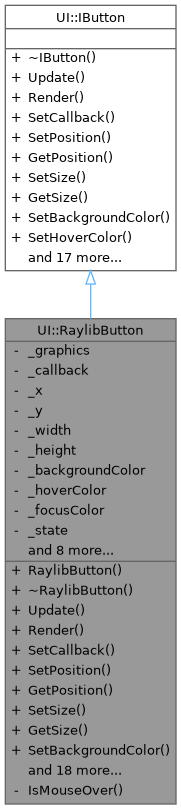
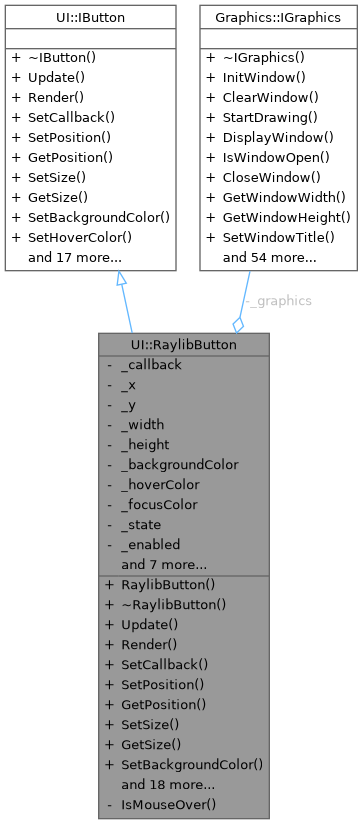
Raylib implementation of the IButton interface. More...
#include <RaylibButton.hpp>
Public Member Functions | |
| RaylibButton (Graphics::IGraphics &graphics) | |
| Construct a new RaylibButton. | |
| ~RaylibButton () override=default | |
| Destroy the RaylibButton. | |
| void | Update () override |
| Update the button internal state (hover/pressed) and trigger callbacks. | |
| void | Render () override |
| Render the button. | |
| void | SetCallback (std::function< void()> callback) override |
| Set callback invoked on click. | |
| void | SetPosition (float x, float y) override |
| Set the top-left position of the button. | |
| void | GetPosition (float &x, float &y) const override |
| Get the current top-left position of the button. | |
| void | SetSize (float width, float height) override |
| Set the button size. | |
| void | GetSize (float &width, float &height) const override |
| Get the current size of the button. | |
| void | SetBackgroundColor (unsigned int color) override |
| Set button background color. | |
| void | SetHoverColor (unsigned int color) override |
| Set button hover color. | |
| void | SetText (const std::string &text) override |
| Set button label text. | |
| void | SetTextSize (int size) override |
| Set label font size in pixels. | |
| void | SetTextColor (unsigned int color) override |
| Set label color. | |
| void | SetFont (int fontHandle) override |
| Set font handle to use for button text. | |
| void | SetAlign (Align align) override |
| Set alignment mode relative to the current window. | |
| Align | GetAlign () const override |
| Get current alignment mode. | |
| void | ApplyAlignment () override |
| Apply alignment (recomputes position based on window size). | |
| ButtonState | GetState () const override |
| Get current button state. | |
| bool | IsEnabled () const override |
| Check if button is enabled. | |
| void | SetEnabled (bool enabled) override |
| Enable/disable the button. | |
| const std::string & | GetText () const override |
| Get button label text. | |
| int | GetTextSize () const override |
| Get label font size. | |
| unsigned int | GetTextColor () const override |
| Get label color. | |
| int | GetFont () const override |
| Get current font handle used by this button. | |
| void | SetFocused (bool focused) override |
| Set the keyboard focus state of the button. | |
| bool | IsFocused () const override |
| Check if this button currently has keyboard focus. | |
| void | TriggerClick () override |
| Programmatically trigger the button's click callback. | |
 Public Member Functions inherited from UI::IButton Public Member Functions inherited from UI::IButton | |
| virtual | ~IButton ()=default |
| Virtual destructor. | |
Private Member Functions | |
| bool | IsMouseOver () const |
| Check whether the mouse cursor is currently over the button rectangle. | |
Private Attributes | |
| Graphics::IGraphics & | _graphics |
| std::function< void()> | _callback {} |
| float | _x {0.0F} |
| float | _y {0.0F} |
| float | _width {100.0F} |
| float | _height {40.0F} |
| unsigned int | _backgroundColor {0xFF808080} |
| unsigned int | _hoverColor {0xFFA0A0A0} |
| unsigned int | _focusColor {0xFF4080FF} |
| ButtonState | _state {ButtonState::NORMAL} |
| bool | _enabled {true} |
| bool | _wasMouseDown {false} |
| bool | _focused {false} |
| std::string | _text |
| int | _textSize {20} |
| unsigned int | _textColor {0xFFFFFFFF} |
| int | _fontHandle {-1} |
| Align | _align {Align::NONE} |
Detailed Description
Raylib implementation of the IButton interface.
Rendering is performed through the project's Graphics::IGraphics wrapper.
Supported features:
- background + hover colors
- click callback
- centered label text (font handle, size, color)
- alignment relative to window (center X/Y)
Definition at line 28 of file RaylibButton.hpp.
Constructor & Destructor Documentation
◆ RaylibButton()
|
explicit |
Construct a new RaylibButton.
- Parameters
-
graphics Graphics wrapper used for input and drawing.
Definition at line 14 of file RaylibButton.cpp.
◆ ~RaylibButton()
|
overridedefault |
Destroy the RaylibButton.
Member Function Documentation
◆ ApplyAlignment()
|
overridevirtual |
Apply alignment (recomputes position based on window size).
- Note
- Call this after SetSize(), or when the window is resized.
Implements UI::IButton.
Definition at line 121 of file RaylibButton.cpp.
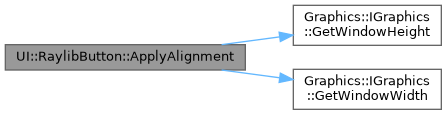
References _align, _graphics, _height, _width, _x, _y, UI::CENTER_BOTH, UI::CENTER_HORIZONTAL, UI::CENTER_VERTICAL, Graphics::IGraphics::GetWindowHeight(), Graphics::IGraphics::GetWindowWidth(), and UI::NONE.
Referenced by SetAlign(), and SetSize().
◆ GetAlign()
|
overridevirtual |
Get current alignment mode.
- Returns
- Align.
Implements UI::IButton.
Definition at line 117 of file RaylibButton.cpp.
References _align.
◆ GetFont()
|
overridevirtual |
Get current font handle used by this button.
- Returns
- Font handle (or -1 for default font).
Implements UI::IButton.
Definition at line 193 of file RaylibButton.cpp.
References _fontHandle.
◆ GetPosition()
|
overridevirtual |
Get the current top-left position of the button.
- Parameters
-
x Output X position in pixels. y Output Y position in pixels.
Implements UI::IButton.
Definition at line 96 of file RaylibButton.cpp.
◆ GetSize()
|
overridevirtual |
Get the current size of the button.
- Parameters
-
width Output width in pixels. height Output height in pixels.
Implements UI::IButton.
Definition at line 107 of file RaylibButton.cpp.
◆ GetState()
|
overridevirtual |
Get current button state.
- Returns
- ButtonState.
Implements UI::IButton.
Definition at line 145 of file RaylibButton.cpp.
References _state.
◆ GetText()
|
overridevirtual |
Get button label text.
- Returns
- Reference to internal string.
Implements UI::IButton.
Definition at line 169 of file RaylibButton.cpp.
References _text.
◆ GetTextColor()
|
overridevirtual |
Get label color.
- Returns
- Color in 0xAARRGGBB format.
Implements UI::IButton.
Definition at line 185 of file RaylibButton.cpp.
References _textColor.
◆ GetTextSize()
|
overridevirtual |
Get label font size.
- Returns
- Font size in pixels.
Implements UI::IButton.
Definition at line 177 of file RaylibButton.cpp.
References _textSize.
◆ IsEnabled()
|
overridevirtual |
Check if button is enabled.
- Returns
- true if enabled.
Implements UI::IButton.
Definition at line 149 of file RaylibButton.cpp.
References _enabled.
◆ IsFocused()
|
overridevirtual |
Check if this button currently has keyboard focus.
- Returns
- true if focused.
Implements UI::IButton.
Definition at line 201 of file RaylibButton.cpp.
References _focused.
◆ IsMouseOver()
|
private |
Check whether the mouse cursor is currently over the button rectangle.
Definition at line 157 of file RaylibButton.cpp.
References _graphics, _height, _x, _y, and Graphics::IGraphics::GetMousePosition().
Referenced by Update().

◆ Render()
|
overridevirtual |
Render the button.
- Note
- Must be called between the backend BeginDrawing/EndDrawing calls.
Implements UI::IButton.
Definition at line 43 of file RaylibButton.cpp.
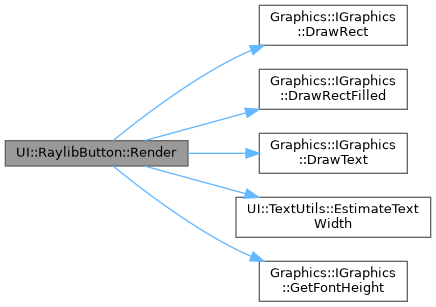
References _backgroundColor, _enabled, _focusColor, _focused, _fontHandle, _graphics, _height, _hoverColor, _state, _text, _textColor, _textSize, _width, _x, _y, Graphics::IGraphics::DrawRect(), Graphics::IGraphics::DrawRectFilled(), Graphics::IGraphics::DrawText(), UI::TextUtils::EstimateTextWidth(), Graphics::IGraphics::GetFontHeight(), UI::HOVERED, and UI::PRESSED.
◆ SetAlign()
|
overridevirtual |
Set alignment mode relative to the current window.
- Parameters
-
align Desired alignment.
- Note
- Implementations may call ApplyAlignment() immediately.
Implements UI::IButton.
Definition at line 112 of file RaylibButton.cpp.
References _align, and ApplyAlignment().

◆ SetBackgroundColor()
|
overridevirtual |
Set button background color.
- Parameters
-
color Color in 0xAARRGGBB format.
Implements UI::IButton.
Definition at line 137 of file RaylibButton.cpp.
References _backgroundColor.
◆ SetCallback()
|
overridevirtual |
Set callback invoked on click.
- Parameters
-
callback Function called when the button is clicked.
Implements UI::IButton.
Definition at line 87 of file RaylibButton.cpp.
References _callback.
◆ SetEnabled()
|
overridevirtual |
Enable/disable the button.
- Parameters
-
enabled true to enable.
Implements UI::IButton.
Definition at line 153 of file RaylibButton.cpp.
References _enabled.
◆ SetFocused()
|
overridevirtual |
Set the keyboard focus state of the button.
- Parameters
-
focused true if this button should be focused.
Implements UI::IButton.
Definition at line 197 of file RaylibButton.cpp.
References _focused.
◆ SetFont()
|
overridevirtual |
Set font handle to use for button text.
- Parameters
-
fontHandle Font handle returned by Graphics::IGraphics::LoadFont(). Use -1 for default font.
Implements UI::IButton.
Definition at line 189 of file RaylibButton.cpp.
References _fontHandle.
◆ SetHoverColor()
|
overridevirtual |
Set button hover color.
- Parameters
-
color Color in 0xAARRGGBB format.
Implements UI::IButton.
Definition at line 141 of file RaylibButton.cpp.
References _hoverColor.
◆ SetPosition()
|
overridevirtual |
Set the top-left position of the button.
- Parameters
-
x X position in pixels. y Y position in pixels.
Implements UI::IButton.
Definition at line 91 of file RaylibButton.cpp.
◆ SetSize()
|
overridevirtual |
Set the button size.
- Parameters
-
width Width in pixels. height Height in pixels.
Implements UI::IButton.
Definition at line 101 of file RaylibButton.cpp.
References _height, _width, and ApplyAlignment().

◆ SetText()
|
overridevirtual |
Set button label text.
- Parameters
-
text UTF-8 text.
Implements UI::IButton.
Definition at line 165 of file RaylibButton.cpp.
References _text.
◆ SetTextColor()
|
overridevirtual |
Set label color.
- Parameters
-
color Color in 0xAARRGGBB format.
Implements UI::IButton.
Definition at line 181 of file RaylibButton.cpp.
References _textColor.
◆ SetTextSize()
|
overridevirtual |
Set label font size in pixels.
- Parameters
-
size Font size.
Implements UI::IButton.
Definition at line 173 of file RaylibButton.cpp.
References _textSize.
◆ TriggerClick()
|
overridevirtual |
Programmatically trigger the button's click callback.
- Note
- Used by keyboard navigation to simulate a click on Enter key.
Implements UI::IButton.
Definition at line 205 of file RaylibButton.cpp.
◆ Update()
|
overridevirtual |
Update the button internal state (hover/pressed) and trigger callbacks.
- Note
- Should be called once per frame.
Implements UI::IButton.
Definition at line 16 of file RaylibButton.cpp.
References _callback, _enabled, _graphics, _state, _wasMouseDown, UI::HOVERED, Graphics::IGraphics::IsMouseButtonDown(), IsMouseOver(), UI::NORMAL, and UI::PRESSED.

Member Data Documentation
◆ _align
|
private |
Definition at line 148 of file RaylibButton.hpp.
Referenced by ApplyAlignment(), GetAlign(), and SetAlign().
◆ _backgroundColor
|
private |
Definition at line 133 of file RaylibButton.hpp.
Referenced by Render(), and SetBackgroundColor().
◆ _callback
|
private |
Definition at line 126 of file RaylibButton.hpp.
Referenced by SetCallback(), TriggerClick(), and Update().
◆ _enabled
|
private |
Definition at line 138 of file RaylibButton.hpp.
Referenced by IsEnabled(), Render(), SetEnabled(), TriggerClick(), and Update().
◆ _focusColor
|
private |
Definition at line 135 of file RaylibButton.hpp.
Referenced by Render().
◆ _focused
|
private |
Definition at line 140 of file RaylibButton.hpp.
Referenced by IsFocused(), Render(), and SetFocused().
◆ _fontHandle
|
private |
Definition at line 146 of file RaylibButton.hpp.
◆ _graphics
|
private |
Definition at line 125 of file RaylibButton.hpp.
Referenced by ApplyAlignment(), IsMouseOver(), Render(), and Update().
◆ _height
|
private |
Definition at line 131 of file RaylibButton.hpp.
Referenced by ApplyAlignment(), GetSize(), IsMouseOver(), Render(), and SetSize().
◆ _hoverColor
|
private |
Definition at line 134 of file RaylibButton.hpp.
Referenced by Render(), and SetHoverColor().
◆ _state
|
private |
Definition at line 137 of file RaylibButton.hpp.
Referenced by GetState(), Render(), and Update().
◆ _text
|
private |
Definition at line 143 of file RaylibButton.hpp.
◆ _textColor
|
private |
Definition at line 145 of file RaylibButton.hpp.
Referenced by GetTextColor(), Render(), and SetTextColor().
◆ _textSize
|
private |
Definition at line 144 of file RaylibButton.hpp.
Referenced by GetTextSize(), Render(), and SetTextSize().
◆ _wasMouseDown
|
private |
Definition at line 139 of file RaylibButton.hpp.
Referenced by Update().
◆ _width
|
private |
Definition at line 130 of file RaylibButton.hpp.
Referenced by ApplyAlignment(), GetSize(), Render(), and SetSize().
◆ _x
|
private |
Definition at line 128 of file RaylibButton.hpp.
Referenced by ApplyAlignment(), GetPosition(), IsMouseOver(), Render(), and SetPosition().
◆ _y
|
private |
Definition at line 129 of file RaylibButton.hpp.
Referenced by ApplyAlignment(), GetPosition(), IsMouseOver(), Render(), and SetPosition().
The documentation for this class was generated from the following files:
- client/UI/Raylib/RaylibButton.hpp
- client/UI/Raylib/RaylibButton.cpp