Abstract interface for UI buttons. More...
#include <IButton.hpp>
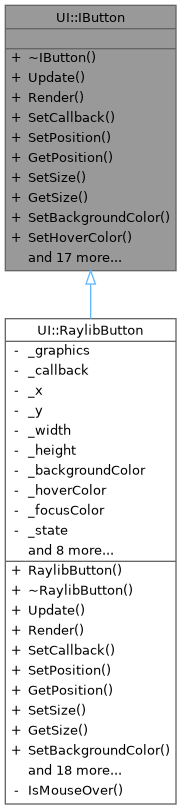
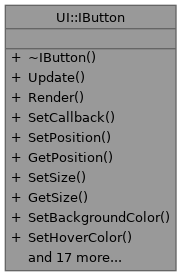
Public Member Functions | |
| virtual | ~IButton ()=default |
| Virtual destructor. | |
| virtual void | Update ()=0 |
| Update the button internal state (hover/pressed) and trigger callbacks. | |
| virtual void | Render ()=0 |
| Render the button. | |
| virtual void | SetCallback (std::function< void()> callback)=0 |
| Set callback invoked on click. | |
| virtual void | SetPosition (float x, float y)=0 |
| Set the top-left position of the button. | |
| virtual void | GetPosition (float &x, float &y) const =0 |
| Get the current top-left position of the button. | |
| virtual void | SetSize (float width, float height)=0 |
| Set the button size. | |
| virtual void | GetSize (float &width, float &height) const =0 |
| Get the current size of the button. | |
| virtual void | SetBackgroundColor (unsigned int color)=0 |
| Set button background color. | |
| virtual void | SetHoverColor (unsigned int color)=0 |
| Set button hover color. | |
| virtual ButtonState | GetState () const =0 |
| Get current button state. | |
| virtual bool | IsEnabled () const =0 |
| Check if button is enabled. | |
| virtual void | SetEnabled (bool enabled)=0 |
| Enable/disable the button. | |
| virtual void | SetText (const std::string &text)=0 |
| Set button label text. | |
| virtual const std::string & | GetText () const =0 |
| Get button label text. | |
| virtual void | SetTextSize (int size)=0 |
| Set label font size in pixels. | |
| virtual int | GetTextSize () const =0 |
| Get label font size. | |
| virtual void | SetTextColor (unsigned int color)=0 |
| Set label color. | |
| virtual unsigned int | GetTextColor () const =0 |
| Get label color. | |
| virtual void | SetFont (int fontHandle)=0 |
| Set font handle to use for button text. | |
| virtual int | GetFont () const =0 |
| Get current font handle used by this button. | |
| virtual void | SetAlign (Align align)=0 |
| Set alignment mode relative to the current window. | |
| virtual Align | GetAlign () const =0 |
| Get current alignment mode. | |
| virtual void | ApplyAlignment ()=0 |
| Apply alignment (recomputes position based on window size). | |
| virtual void | SetFocused (bool focused)=0 |
| Set the keyboard focus state of the button. | |
| virtual bool | IsFocused () const =0 |
| Check if this button currently has keyboard focus. | |
| virtual void | TriggerClick ()=0 |
| Programmatically trigger the button's click callback. | |
Detailed Description
Abstract interface for UI buttons.
This interface defines a minimal, backend-agnostic contract for interactive buttons:
- input update (hover/pressed/click)
- rendering
- visuals (size, position, colors)
- label text (font, color, size)
- optional alignment helpers relative to the window
Definition at line 50 of file IButton.hpp.
Constructor & Destructor Documentation
◆ ~IButton()
|
virtualdefault |
Virtual destructor.
Member Function Documentation
◆ ApplyAlignment()
|
pure virtual |
Apply alignment (recomputes position based on window size).
- Note
- Call this after SetSize(), or when the window is resized.
Implemented in UI::RaylibButton.
◆ GetAlign()
|
pure virtual |
◆ GetFont()
|
pure virtual |
Get current font handle used by this button.
- Returns
- Font handle (or -1 for default font).
Implemented in UI::RaylibButton.
◆ GetPosition()
|
pure virtual |
Get the current top-left position of the button.
- Parameters
-
x Output X position in pixels. y Output Y position in pixels.
Implemented in UI::RaylibButton.
◆ GetSize()
|
pure virtual |
Get the current size of the button.
- Parameters
-
width Output width in pixels. height Output height in pixels.
Implemented in UI::RaylibButton.
◆ GetState()
|
pure virtual |
◆ GetText()
|
pure virtual |
◆ GetTextColor()
|
pure virtual |
◆ GetTextSize()
|
pure virtual |
◆ IsEnabled()
|
pure virtual |
◆ IsFocused()
|
pure virtual |
Check if this button currently has keyboard focus.
- Returns
- true if focused.
Implemented in UI::RaylibButton.
◆ Render()
|
pure virtual |
Render the button.
- Note
- Must be called between the backend BeginDrawing/EndDrawing calls.
Implemented in UI::RaylibButton.
◆ SetAlign()
|
pure virtual |
Set alignment mode relative to the current window.
- Parameters
-
align Desired alignment.
- Note
- Implementations may call ApplyAlignment() immediately.
Implemented in UI::RaylibButton.
◆ SetBackgroundColor()
|
pure virtual |
Set button background color.
- Parameters
-
color Color in 0xAARRGGBB format.
Implemented in UI::RaylibButton.
◆ SetCallback()
|
pure virtual |
Set callback invoked on click.
- Parameters
-
callback Function called when the button is clicked.
Implemented in UI::RaylibButton.
◆ SetEnabled()
|
pure virtual |
◆ SetFocused()
|
pure virtual |
Set the keyboard focus state of the button.
- Parameters
-
focused true if this button should be focused.
Implemented in UI::RaylibButton.
◆ SetFont()
|
pure virtual |
Set font handle to use for button text.
- Parameters
-
fontHandle Font handle returned by Graphics::IGraphics::LoadFont(). Use -1 for default font.
Implemented in UI::RaylibButton.
◆ SetHoverColor()
|
pure virtual |
Set button hover color.
- Parameters
-
color Color in 0xAARRGGBB format.
Implemented in UI::RaylibButton.
◆ SetPosition()
|
pure virtual |
Set the top-left position of the button.
- Parameters
-
x X position in pixels. y Y position in pixels.
Implemented in UI::RaylibButton.
◆ SetSize()
|
pure virtual |
Set the button size.
- Parameters
-
width Width in pixels. height Height in pixels.
Implemented in UI::RaylibButton.
◆ SetText()
|
pure virtual |
◆ SetTextColor()
|
pure virtual |
◆ SetTextSize()
|
pure virtual |
◆ TriggerClick()
|
pure virtual |
Programmatically trigger the button's click callback.
- Note
- Used by keyboard navigation to simulate a click on Enter key.
Implemented in UI::RaylibButton.
◆ Update()
|
pure virtual |
Update the button internal state (hover/pressed) and trigger callbacks.
- Note
- Should be called once per frame.
Implemented in UI::RaylibButton.
The documentation for this class was generated from the following file:
- client/UI/IButton.hpp